2016년 7월 8일 금요일

16day java


1
import java.io.IOException;
import java.net.ServerSocket;
import java.net.Socket;

public class TcpServerEx01 {

 public static void main(String[] args) {
  // 서버만들기
  ServerSocket serverSocket = null;
  Socket socket = null;
  
  try {
   serverSocket = new ServerSocket(7777);
   System.out.println("서버가 준비되었습니다.");
   
   socket = serverSocket.accept();
   System.out.println("클라이언트와 연결되었습니다.");
  } catch (IOException e) {
   // TODO Auto-generated catch block
   e.printStackTrace();
  } finally {
   if(serverSocket != null) try{ serverSocket.close();} catch(IOException e){}
   if(socket != null) try{ socket.close();} catch(IOException e){}
  }
 }

}

--cmd 창에서 서버오픈하기
cd c:\java\workspace\NetworkEx02\bin
java TcpServerEx01
서버준비 상태에서 다시 같은 서버를 오픈 하려고하면 에러남


2. 이클립스에서 서버와 클라이언트 둘다 실행 못함. 서버는 cmd에서 실행시킴
import java.io.IOException;
import java.net.Socket;
import java.net.UnknownHostException;

public class TcpClientEx01 {

 public static void main(String[] args) {
  // 특정 컴퓨터에 접속하기
  Socket socket = null;
  try {
   System.out.println("서버와 연결 중입니다.");
   socket = new Socket("localhost", 7777); //자신의 IP//서버쪽 포트를 적어줌 //클라이언트 포트는 랜덤하게 열림
   System.out.println("서버와 연결되었습니다.");
  } catch (UnknownHostException e) {
   // TODO Auto-generated catch block
   e.printStackTrace();
  } catch (IOException e) {
   // TODO Auto-generated catch block
   e.printStackTrace();
  } finally {
   if(socket != null) try{ socket.close();} catch(IOException e){}
  }
 }

}
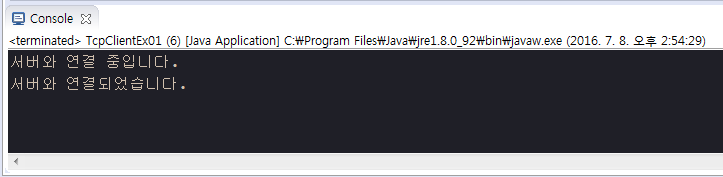
 클라이언트 접속 클래스를 실행시킬 경우 서버대기상태 → 연결되었습니다로 바뀜


3
import java.io.BufferedWriter;
import java.io.IOException;
import java.io.OutputStreamWriter;
import java.net.ServerSocket;
import java.net.Socket;

public class TcpServerEx01 {

 public static void main(String[] args) {
  ServerSocket serverSocket = null;
  Socket socket = null;
  BufferedWriter bw = null; //서버쪽에서 클라이언트에게 글자보내기
  
  try {
   serverSocket = new ServerSocket(7777);
   System.out.println("서버가 준비되었습니다.");
   
   socket = serverSocket.accept();
   System.out.println("클라이언트와 연결되었습니다.");
   
   bw = new BufferedWriter(new OutputStreamWriter(socket.getOutputStream()));
   bw.write("Hello Socket" + "\n"); //엔터키를 넣어야지 클라이언트쪽에서 읽을 수 있슴
   bw.flush(); //버퍼 데이터를 비움
   
   System.out.println("전송이 완료되었습니다.");

  } catch (IOException e) {
   // TODO Auto-generated catch block
   e.printStackTrace();
  } finally {
   if(serverSocket != null) try{ serverSocket.close();} catch(IOException e){}
   if(socket != null) try{ socket.close();} catch(IOException e){}
   if(bw != null) try{ bw.close();} catch(IOException e){}
  }
 }

}

import java.io.BufferedReader;
import java.io.IOException;
import java.io.InputStreamReader;
import java.net.Socket;
import java.net.UnknownHostException;

public class TcpClientEx01 {

 public static void main(String[] args) {
  // 특정 컴퓨터에 접속하기
  Socket socket = null;
  BufferedReader br = null;  //서버로부터 글자 읽어오기
  
  try {
   System.out.println("서버와 연결 중입니다.");
   socket = new Socket("localhost", 7777);
   System.out.println("서버와 연결되었습니다.");
   
   br = new BufferedReader(new InputStreamReader(socket.getInputStream()));
   System.out.println("서버에서 보낸 글씨 : " + br.readLine()); //readLine 엔터키까지 읽음
   
  } catch (UnknownHostException e) {
   e.printStackTrace();
  } catch (IOException e) {
   e.printStackTrace();
  } finally {
   if(socket != null) try{ socket.close();} catch(IOException e){}
   if(br != null) try{ br.close();} catch(IOException e){}
  }
 }

}


4. 반대로 클라이언트가 정보를 보낼 수 있음
//서버
import java.io.BufferedReader;
import java.io.IOException;
import java.io.InputStreamReader;
import java.io.OutputStreamWriter;
import java.net.ServerSocket;
import java.net.Socket;

public class TcpServerEx01 {

 public static void main(String[] args) {
  ServerSocket serverSocket = null;
  Socket socket = null;
  BufferedReader br = null; //서버쪽에서 클라이언트 읽기
  
  try {
   serverSocket = new ServerSocket(7777);
   System.out.println("서버가 준비되었습니다.");
   
   socket = serverSocket.accept();
   System.out.println("클라이언트와 연결되었습니다.");
   
   br = new BufferedReader(new InputStreamReader(socket.getInputStream()));
   System.out.println("클라이언트에서 보낸 글씨 : " + br.readLine()); //readLine 엔터키까지 읽음

  } catch (IOException e) {
   // TODO Auto-generated catch block
   e.printStackTrace();
  } finally {
   if(serverSocket != null) try{ serverSocket.close();} catch(IOException e){}
   if(socket != null) try{ socket.close();} catch(IOException e){}
   if(br != null) try{ br.close();} catch(IOException e){}
  }
 }

}

//클라이언트
import java.io.BufferedWriter;
import java.io.IOException;
import java.io.InputStreamReader;
import java.io.OutputStreamWriter;
import java.net.Socket;
import java.net.UnknownHostException;

public class TcpClientEx01 {

 public static void main(String[] args) {
  // 특정 컴퓨터에 접속하기
  Socket socket = null;
  BufferedWriter bw = null;  //서버로 글자 보내기
  
  try {
   System.out.println("서버와 연결 중입니다.");
   socket = new Socket("localhost", 7777);
   System.out.println("서버와 연결되었습니다.");
   
   bw = new BufferedWriter(new OutputStreamWriter(socket.getOutputStream()));
   bw.write("Hello Socket" + "\n"); //엔터키를 넣어야지 서버에서 readline으로 읽을 수 있슴
   bw.flush(); //버퍼 데이터를 비움
   
   System.out.println("전송이 완료되었습니다.");
   
  } catch (UnknownHostException e) {
   e.printStackTrace();
  } catch (IOException e) {
   e.printStackTrace();
  } finally {
   if(socket != null) try{ socket.close();} catch(IOException e){}
   if(bw != null) try{ bw.close();} catch(IOException e){}
  }
 }

}


5
import java.io.BufferedReader;
import java.io.BufferedWriter;
import java.io.IOException;
import java.io.InputStreamReader;
import java.io.OutputStreamWriter;
import java.net.ServerSocket;
import java.net.Socket;

public class TcpServerEx01 {

 public static void main(String[] args) {
  ServerSocket serverSocket = null;
  Socket socket = null;
  BufferedReader br = null; //서버, 클라이언트 양방향 읽기, 쓰기
  BufferedWriter bw = null;
  
  try {
   serverSocket = new ServerSocket(7777);
   System.out.println("서버가 준비되었습니다.");
   
   socket = serverSocket.accept();
   System.out.println("클라이언트와 연결되었습니다.");
   
   br = new BufferedReader(new InputStreamReader(socket.getInputStream(),"utf-8"));
   bw = new BufferedWriter(new OutputStreamWriter(socket.getOutputStream(),"utf-8"));
   //utf-8 설정가능
   
   bw.write(br.readLine()+"\n");  //클라이언트에서 보낸 글자를 다시 클라이언트에게 보냄
   bw.flush();
   System.out.println("전송완료");
   
  } catch (IOException e) {
   // TODO Auto-generated catch block
   e.printStackTrace();
  } finally {
   if(serverSocket != null) try{ serverSocket.close();} catch(IOException e){}
   if(socket != null) try{ socket.close();} catch(IOException e){}
   if(br != null) try{ br.close();} catch(IOException e){}
   if(bw != null) try{ bw.close();} catch(IOException e){}
  }
 }

}

import java.io.BufferedReader;
import java.io.BufferedWriter;
import java.io.IOException;
import java.io.InputStreamReader;
import java.io.OutputStreamWriter;
import java.net.Socket;
import java.net.UnknownHostException;

public class TcpClientEx01 {

 public static void main(String[] args) {
  // 특정 컴퓨터에 접속하기
  Socket socket = null;
  BufferedWriter bw = null;  //양방향 읽기, 쓰기
  BufferedReader br = null;
  
  try {
   System.out.println("서버와 연결 중입니다.");
   socket = new Socket("localhost", 7777);
   System.out.println("서버와 연결되었습니다.");
   
   bw = new BufferedWriter(new OutputStreamWriter(socket.getOutputStream(),"utf-8"));
   br = new BufferedReader(new InputStreamReader(socket.getInputStream(),"utf-8"));
   //utf-8 설정가능
   
   bw.write("안녕한글" + "\n"); //서버에 메시지 보냄
   bw.flush();
   System.out.println("전송이 완료되었습니다.");
   
   System.out.println("메시지 : "+ br.readLine()); //서버로 부터 메시지 받음
   
  } catch (UnknownHostException e) {
   e.printStackTrace();
  } catch (IOException e) {
   e.printStackTrace();
  } finally {
   if(socket != null) try{ socket.close();} catch(IOException e){}
   if(bw != null) try{ bw.close();} catch(IOException e){}
   if(br != null) try{ br.close();} catch(IOException e){}
  }
 }

}


6
import java.io.BufferedReader;
import java.io.IOException;
import java.io.InputStreamReader;
import java.io.OutputStreamWriter;
import java.net.ServerSocket;
import java.net.Socket;

public class TcpServerEx01 {

 public static void main(String[] args) {
  ServerSocket serverSocket = null;
  Socket socket = null;
  BufferedReader br = null;
  
  try {
   serverSocket = new ServerSocket(7777);
   System.out.println("서버가 준비되었습니다.");
   
   socket = serverSocket.accept();
   System.out.println("클라이언트와 연결되었습니다.");
   
   br = new BufferedReader(new InputStreamReader(socket.getInputStream(),"utf-8"));
   //클라이언트에서 여러줄 보낸 것을 모두 읽어 드림
   String msg = null;
   while((msg = br.readLine()) != null){
    System.out.println("클라이언트에서 보낸 글씨 : " + msg);
   }
   

  } catch (IOException e) {
   // TODO Auto-generated catch block
   e.printStackTrace();
  } finally {
   if(serverSocket != null) try{ serverSocket.close();} catch(IOException e){}
   if(socket != null) try{ socket.close();} catch(IOException e){}
   if(br != null) try{ br.close();} catch(IOException e){}
  }
 }

}

import java.io.BufferedWriter;
import java.io.IOException;
import java.io.InputStreamReader;
import java.io.OutputStreamWriter;
import java.net.Socket;
import java.net.UnknownHostException;

public class TcpClientEx01 {

 public static void main(String[] args) {
  // 특정 컴퓨터에 접속하기
  Socket socket = null;
  BufferedWriter bw = null;  //서버로부터 글자 읽어오기
  
  try {
   System.out.println("서버와 연결 중입니다.");
   socket = new Socket("localhost", 7777);
   System.out.println("서버와 연결되었습니다.");
   
   bw = new BufferedWriter(new OutputStreamWriter(socket.getOutputStream(),"utf-8"));
   bw.write("안녕 한글1" + "\n");
   bw.write("안녕 한글2" + "\n");
   bw.write("안녕 한글3" + "\n");
   bw.write("안녕 한글4" + "\n");
   bw.write("안녕 한글5" + "\n");
   bw.flush(); //버퍼 데이터를 비움
   
   System.out.println("전송이 완료되었습니다.");
   
  } catch (UnknownHostException e) {
   e.printStackTrace();
  } catch (IOException e) {
   e.printStackTrace();
  } finally {
   if(socket != null) try{ socket.close();} catch(IOException e){}
   if(bw != null) try{ bw.close();} catch(IOException e){}
  }
 }

}


7
import java.io.BufferedReader;
import java.io.BufferedWriter;
import java.io.IOException;
import java.io.InputStreamReader;
import java.io.OutputStreamWriter;
import java.net.ServerSocket;
import java.net.Socket;

import javax.swing.SpringLayout.Constraints;

public class TcpServerEx01 {

 public static void main(String[] args) {
  ServerSocket serverSocket = null;
  Socket socket = null;
  BufferedReader br = null; //서버쪽에서 클라이언트 읽기
  BufferedWriter bw = null; //서버쪽에서 보내기
  
  try {
   serverSocket = new ServerSocket(7777);
   System.out.println("서버가 준비되었습니다.");
   
   socket = serverSocket.accept();
   System.out.println("클라이언트와 연결되었습니다.");
   
   br = new BufferedReader(new InputStreamReader(socket.getInputStream(),"utf-8"));
   bw = new BufferedWriter(new OutputStreamWriter(socket.getOutputStream(),"utf-8"));
   //utf-8 설정가능
   
   //클라이언트가 보낸 여러줄의 메시지를 읽고 다시 클라이언트에게 보냄
   String msg = null;
   //while((msg = br.readLine()) != null){ //무한루프에 빠질 수 있음 
                                           //클라이언트와 연결이 종료되어야지 서버가br로 읽을때 null값을 가짐
                                           //그러나 클라이언트의 bw 코드뒤에 br이 있어서 통신이 종료되는 finally 까지 진행되지 않음
   while(!(msg = br.readLine()).contains("exit")){ 
    bw.write(msg+"\n");
   }
   bw.flush();
   
   
   System.out.println("전송완료");
   
  } catch (IOException e) {
   // TODO Auto-generated catch block
   e.printStackTrace();
  } finally {
   if(br != null) try{ br.close();} catch(IOException e){}
   if(bw != null) try{ bw.close();} catch(IOException e){}
   if(socket != null) try{ socket.close();} catch(IOException e){}
   if(serverSocket != null) try{ serverSocket.close();} catch(IOException e){}
  }
 }

}

import java.io.BufferedReader;
import java.io.BufferedWriter;
import java.io.IOException;
import java.io.InputStreamReader;
import java.io.OutputStreamWriter;
import java.net.Socket;
import java.net.UnknownHostException;

public class TcpClientEx01 {

 public static void main(String[] args) {
  // 특정 컴퓨터에 접속하기
  Socket socket = null;
  BufferedWriter bw = null;  //서버로부터 글자 읽어오기
  BufferedReader br = null;
  
  try {
   System.out.println("서버와 연결 중입니다.");
   socket = new Socket("localhost", 7777);
   System.out.println("서버와 연결되었습니다.");
   
   bw = new BufferedWriter(new OutputStreamWriter(socket.getOutputStream(),"utf-8"));
   br = new BufferedReader(new InputStreamReader(socket.getInputStream(),"utf-8"));
   //utf-8 설정가능
   
   bw.write("안녕한글1" + "\n"); //서버에 메시지 보냄
   bw.write("안녕한글2" + "\n"); 
   bw.write("안녕한글3" + "\n");
   bw.write("안녕한글4" + "\n"); 
   bw.write("안녕한글5" + "\n"); 
   bw.write("exit \n"); //종료코드 보냄
   bw.flush();
   System.out.println("전송이 완료되었습니다.");
   
   //서버로 부터 여러줄 메시지 받음
   String msg = null;
   while((msg = br.readLine()) != null){
    System.out.println("메시지 : "+ msg);
   }
   
   System.out.println("모든 메시지를 전송 받았습니다.");
   
  } catch (UnknownHostException e) {
   e.printStackTrace();
  } catch (IOException e) {
   e.printStackTrace();
  } finally {
   if(br != null) try{ br.close();} catch(IOException e){}
   if(bw != null) try{ bw.close();} catch(IOException e){}
   if(socket != null) try{ socket.close();} catch(IOException e){}
  }
 }

}


8
import java.io.BufferedReader;
import java.io.BufferedWriter;
import java.io.IOException;
import java.io.InputStreamReader;
import java.io.OutputStreamWriter;
import java.net.ServerSocket;
import java.net.Socket;
import java.util.Scanner;

import javax.swing.SpringLayout.Constraints;

public class TcpServerEx01 {

    public static void main(String[] args) {
        ServerSocket serverSocket = null;
        Socket    socket = null;
        BufferedReader br = null; //서버쪽에서 클라이언트 읽기
        BufferedWriter bw = null; //서버쪽에서 보내기
        
        
        try {
            serverSocket = new ServerSocket(7777);
            System.out.println("서버가 준비되었습니다.");
            
            socket = serverSocket.accept();
            System.out.println("클라이언트와 연결되었습니다.");
            
            br = new BufferedReader(new InputStreamReader(socket.getInputStream(),"utf-8"));
            bw = new BufferedWriter(new OutputStreamWriter(socket.getOutputStream(),"utf-8"));
            
            //클라이언트가 보낸 구구단 단수를 읽음 //숫자로 형변환
            int start = Integer.parseInt(br.readLine());
            int end = Integer.parseInt(br.readLine());
            //구구단만들어 보냄
            for(int i = start; i<=end; i++){
                String result= "";
                for(int j = 1; j<10; j++){
                    result += i+"*"+j+" = "+i*j+" \t";
                }
                result += "\n";
                bw.write(result);
            }
            bw.flush();
            
            
            System.out.println("전송완료");
            
        } catch (IOException e) {
            // TODO Auto-generated catch block
            e.printStackTrace();
        } finally {
            if(br != null) try{ br.close();} catch(IOException e){}
            if(bw != null) try{ bw.close();} catch(IOException e){}
            if(socket != null) try{ socket.close();} catch(IOException e){}
            if(serverSocket != null) try{ serverSocket.close();} catch(IOException e){}
        }
    }

}

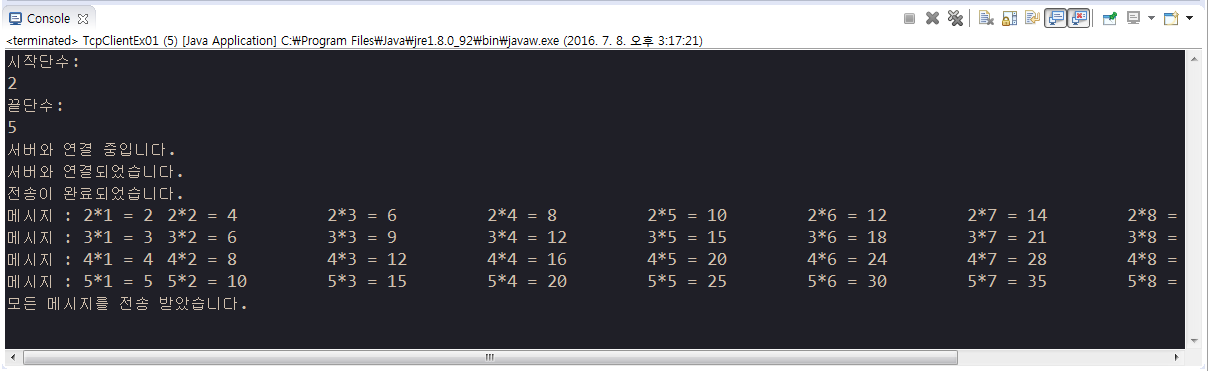
//클라이언트에서 구구단 단수를 입력해서 서버로부터 구구단 결과값 받기
import java.io.BufferedReader;
import java.io.BufferedWriter;
import java.io.IOException;
import java.io.InputStreamReader;
import java.io.OutputStreamWriter;
import java.net.Socket;
import java.net.UnknownHostException;
import java.util.Scanner;

public class TcpClientEx01 {

 public static void main(String[] args) {
  // 클라이언트
  Socket socket = null;
  BufferedWriter bw = null;
  BufferedReader br = null;
  
  //구구단 시작단수 와 끝단수를 입력 받음
  Scanner scan = new Scanner(System.in);
    System.out.println("시작단수: ");
    String start = scan.next();
    System.out.println("끝단수: ");
    String end = scan.next();
    scan.close();
  
  
  try {
   System.out.println("서버와 연결 중입니다.");
   socket = new Socket("localhost", 7777);
   System.out.println("서버와 연결되었습니다.");
   
   bw = new BufferedWriter(new OutputStreamWriter(socket.getOutputStream(),"utf-8"));
   br = new BufferedReader(new InputStreamReader(socket.getInputStream(),"utf-8"));
   //utf-8 설정가능
   
   bw.write(start + "\n"); //서버에 시작단수 끝단수 보냄
   bw.write(end + "\n"); 
   bw.flush();
   System.out.println("전송이 완료되었습니다.");
   
   //서버로 부터 여러줄 메시지 받음
   String msg = null;
   while((msg = br.readLine()) != null){
    System.out.println("메시지 : "+ msg);
   }
   
   System.out.println("모든 메시지를 전송 받았습니다.");
   
  } catch (UnknownHostException e) {
   e.printStackTrace();
  } catch (IOException e) {
   e.printStackTrace();
  } finally {
   if(br != null) try{ br.close();} catch(IOException e){}
   if(bw != null) try{ bw.close();} catch(IOException e){}
   if(socket != null) try{ socket.close();} catch(IOException e){}
  }
 }

}


9
import java.io.IOException;
import java.net.ServerSocket;
import java.net.Socket;

public class TcpServerEx01 {

 public static void main(String[] args) {
  // 서버를 종료하지 않고 무한루프
  ServerSocket serverSocket = null;
  Socket socket = null;
  
  try {
   serverSocket = new ServerSocket(7777);
   
   while (true) {
    try {
     System.out.println("서버가 준비되었습니다");
     socket = serverSocket.accept(); //멈추는 부분
     
     System.out.println("클라이언트와 연결되었습니다.");
    } catch (IOException e) {
     // TODO Auto-generated catch block
     e.printStackTrace();
    } finally {
     if(socket != null) try{ socket.close();} catch(IOException e){}
    }
   }
  } catch (IOException e) {
   // TODO Auto-generated catch block
   e.printStackTrace();
  } finally {
   if(serverSocket != null) try{ serverSocket.close();} catch(IOException e){}
  }
 }

}

import java.io.BufferedReader;
import java.io.IOException;
import java.io.InputStreamReader;
import java.net.Socket;
import java.net.UnknownHostException;

public class TcpClientEx01 {

 public static void main(String[] args) {
  // 클라이언트
  Socket socket = null;
  
  try {
   System.out.println("서버와 연결 중입니다.");
   socket = new Socket("localhost", 7777);
   System.out.println("서버와 연결되었습니다.");
   
   
  } catch (UnknownHostException e) {
   e.printStackTrace();
  } catch (IOException e) {
   e.printStackTrace();
  } finally {
   if(socket != null) try{ socket.close();} catch(IOException e){}
  }
 }

}

10
import java.io.BufferedReader;
import java.io.BufferedWriter;
import java.io.IOException;
import java.io.InputStreamReader;
import java.io.OutputStreamWriter;
import java.net.ServerSocket;
import java.net.Socket;

public class TcpServerEx01 {

 public static void main(String[] args) {
  // 서버를 종료하지 않고 무한루프 //클라이언트와 입출력 처리할 수있음
  ServerSocket serverSocket = null;
  Socket socket = null;
  BufferedReader br = null;
  BufferedWriter bw = null;
  
  try {
   serverSocket = new ServerSocket(7777);
   
   while (true) {
    try {
     System.out.println("서버가 준비되었습니다");
     socket = serverSocket.accept(); //멈추는 부분
     
     System.out.println("클라이언트와 연결되었습니다.");
     
     br = new BufferedReader(new InputStreamReader(socket.getInputStream(), "utf-8"));
     bw = new BufferedWriter(new OutputStreamWriter(socket.getOutputStream(),"utf-8"));
     
     bw.write(br.readLine() + "\n"); //클라이언트로 입력을 받아서 다시 보냄
     bw.flush();
     
    } catch (IOException e) {
     // TODO Auto-generated catch block
     e.printStackTrace();
    } finally {
     if(socket != null) try{ socket.close();} catch(IOException e){}
     if(br != null) try{ br.close();} catch(IOException e){}
     if(bw != null) try{ bw.close();} catch(IOException e){}
    }
   }
  } catch (IOException e) {
   // TODO Auto-generated catch block
   e.printStackTrace();
  } finally {
   if(serverSocket != null) try{ serverSocket.close();} catch(IOException e){}
  }
 }

}

import java.io.BufferedReader;
import java.io.BufferedWriter;
import java.io.IOException;
import java.io.InputStreamReader;
import java.io.OutputStreamWriter;
import java.net.Socket;
import java.net.UnknownHostException;

public class TcpClientEx01 {

 public static void main(String[] args) {
  // 클라이언트
  Socket socket = null;
  BufferedWriter bw = null;
  BufferedReader br = null;
  
  try {
   System.out.println("서버와 연결 중입니다.");
   socket = new Socket("localhost", 7777);
   System.out.println("서버와 연결되었습니다.");
   
   bw = new BufferedWriter(new OutputStreamWriter(socket.getOutputStream(),"utf-8"));
   br = new BufferedReader(new InputStreamReader(socket.getInputStream(),"utf-8"));
   //utf-8 설정가능
   
   bw.write("안녕한글1" + "\n"); //서버에 메시지 보냄
   bw.flush();
   System.out.println("전송이 완료되었습니다.");
   
   System.out.println("메시지 : " +br.readLine());
   
  } catch (UnknownHostException e) {
   e.printStackTrace();
  } catch (IOException e) {
   e.printStackTrace();
  } finally {
   if(socket != null) try{ socket.close();} catch(IOException e){}
   if(br != null) try{ br.close();} catch(IOException e){}
   if(bw != null) try{ bw.close();} catch(IOException e){}
  }
 }

}


11
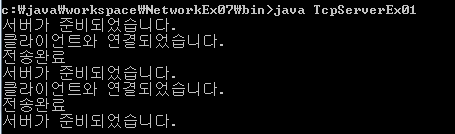
//구구단 서버 무한루프
import java.io.BufferedReader;
import java.io.BufferedWriter;
import java.io.IOException;
import java.io.InputStreamReader;
import java.io.OutputStreamWriter;
import java.net.ServerSocket;
import java.net.Socket;
import java.util.Scanner;

import javax.swing.SpringLayout.Constraints;

public class TcpServerEx01 {

    public static void main(String[] args) {
        ServerSocket serverSocket = null;
        Socket    socket = null;
        BufferedReader br = null; //서버쪽에서 클라이언트 읽기
        BufferedWriter bw = null; //서버쪽에서 보내기
        
        try {
            serverSocket = new ServerSocket(7777);
            
            while(true){
                try {
                    
                    System.out.println("서버가 준비되었습니다.");
                    
                    socket = serverSocket.accept();
                    System.out.println("클라이언트와 연결되었습니다.");
                    
                    br = new BufferedReader(new InputStreamReader(socket.getInputStream(),"utf-8"));
                    bw = new BufferedWriter(new OutputStreamWriter(socket.getOutputStream(),"utf-8"));
                    
                    //클라이언트가 보낸 구구단 단수를 읽음 //숫자로 형변환
                    int start = Integer.parseInt(br.readLine());
                    int end = Integer.parseInt(br.readLine());
                    //구구단만들어 보냄
                    for(int i = start; i<=end; i++){
                        String result= "";
                        for(int j = 1; j<10; j++){
                            result += i+"*"+j+" = "+i*j+" \t";
                        }
                        result += "\n";
                        bw.write(result);
                    }
                    bw.flush();
                    
                    
                    System.out.println("전송완료");
                    
                } catch (IOException e) {
                    // TODO Auto-generated catch block
                    e.printStackTrace();
                } finally {
                    if(br != null) try{ br.close();} catch(IOException e){}
                    if(bw != null) try{ bw.close();} catch(IOException e){}
                    if(socket != null) try{ socket.close();} catch(IOException e){}
                }
            }
        } catch (NumberFormatException e1) {
            // TODO Auto-generated catch block
            e1.printStackTrace();
        } catch (IOException e1) {
            // TODO Auto-generated catch block
            e1.printStackTrace();
        } finally {
        if(serverSocket != null) try{ serverSocket.close();} catch(IOException e){}
        }
    }

}
//클라이언트 요청은 위와 동일
import java.io.BufferedReader;
import java.io.BufferedWriter;
import java.io.IOException;
import java.io.InputStreamReader;
import java.io.OutputStreamWriter;
import java.net.Socket;
import java.net.UnknownHostException;
import java.util.Scanner;

public class TcpClientEx01 {

 public static void main(String[] args) {
  // 클라이언트
  Socket socket = null;
  BufferedWriter bw = null;
  BufferedReader br = null;
  
  //구구단 시작단수 와 끝단수를 입력 받음
  Scanner scan = new Scanner(System.in);
    System.out.println("시작단수: ");
    String start = scan.next();
    System.out.println("끝단수: ");
    String end = scan.next();
    scan.close();
  
  
  try {
   System.out.println("서버와 연결 중입니다.");
   socket = new Socket("localhost", 7777);
   System.out.println("서버와 연결되었습니다.");
   
   bw = new BufferedWriter(new OutputStreamWriter(socket.getOutputStream(),"utf-8"));
   br = new BufferedReader(new InputStreamReader(socket.getInputStream(),"utf-8"));
   //utf-8 설정가능
   
   bw.write(start + "\n"); //서버에 시작단수 끝단수 보냄
   bw.write(end + "\n"); 
   bw.flush();
   System.out.println("전송이 완료되었습니다.");
   
   //서버로 부터 여러줄 메시지 받음
   String msg = null;
   while((msg = br.readLine()) != null){
    System.out.println("메시지 : "+ msg);
   }
   
   System.out.println("모든 메시지를 전송 받았습니다.");
   
  } catch (UnknownHostException e) {
   e.printStackTrace();
  } catch (IOException e) {
   e.printStackTrace();
  } finally {
   if(br != null) try{ br.close();} catch(IOException e){}
   if(bw != null) try{ bw.close();} catch(IOException e){}
   if(socket != null) try{ socket.close();} catch(IOException e){}
  }
 }

}

12
//채팅 서버 만들기
import java.io.BufferedReader;
import java.io.BufferedWriter;
import java.io.IOException;
import java.io.InputStreamReader;
import java.io.OutputStreamWriter;
import java.net.ServerSocket;
import java.net.Socket;
import java.util.Collections;
import java.util.HashMap;
import java.util.Iterator;


public class ChatServer {
    //클라이언트의 집합을 관리할 컬렉션 만듦
    private HashMap<String, BufferedWriter> clients;  //id, 얘기 통로 가지고옴
    
    public static void main(String args[]) {
        // TODO Auto-generated method stub
        new ChatServer().start();
    } 
    
    public ChatServer() {
        clients = new HashMap<String, BufferedWriter>();
        //Collections.synchronizedMap(clients); //동기화 기능
    }

    public void start() {
        ServerSocket serverSocket = null;
        Socket socket = null;

        try {
            serverSocket = new ServerSocket(7777);
            System.out.println("서버가 시작되었습니다.");

            while(true) {
                socket = serverSocket.accept();//클라이언트를 받아들여 소켓을 만듦
                ServerReceiver thread = new ServerReceiver(socket);  //소켓을 쓰레드로 처리함 //클라이언트 하나당 쓰레드 하나 만듦
                thread.start();
            }
        } catch(IOException e) {
            // TODO Auto-generated catch block
            e.printStackTrace();
        }
    }

    public void sendToAll(String msg) { //모든 클라이언트에게 메세지를 보내는 함수를 생성
        Iterator<String> it = clients.keySet().iterator(); //iterator 컬렉션안의 데이터를 하나씩 뽑아냄
        
        while(it.hasNext()) {
            try {
                BufferedWriter bw = (BufferedWriter)clients.get(it.next()); //해쉬맵에 저장된 클라이언트 각각의 소캣연결 bufferedWriter 가져옴
                bw.write(msg + System.getProperty("line.separator"));  //System.getProperty 엔터키
                bw.flush();
            } catch(IOException e) {
                // TODO Auto-generated catch block
                e.printStackTrace();                
            }
        }
    }

    class ServerReceiver extends Thread {  //스레드를 통해서 클라이언트 읽기와 쓰기가 가능해짐
        private Socket socket;
        private BufferedReader br;
        private BufferedWriter bw;

        public ServerReceiver(Socket socket) { //클라이언트 각각의 연결소켓을 매개변수로 받음
            this.socket = socket;
            try {
                br = new BufferedReader(new InputStreamReader(socket.getInputStream(), "utf-8"));
                bw = new BufferedWriter(new OutputStreamWriter(socket.getOutputStream(), "utf-8"));
            } catch(IOException e) {
                // TODO Auto-generated catch block
                e.printStackTrace();                    
            }
        }

        public void run() {
            String name = "";
            try {
                name = br.readLine();
                sendToAll("#" + name + "님이 들어오셨습니다.");

                clients.put(name, bw);
                
                System.out.println("현재 서버접속자 수는 " + clients.size() + "입니다.");
                
                while(br != null) { //무한루프 //클라이언트와 접속이 끊어질때 까지 무한히 반복함
                    sendToAll(br.readLine());                
                }
                
            } catch(IOException e) {
                // TODO Auto-generated catch block
                e.printStackTrace();                
            } finally {
                sendToAll("#" + name + "님이 나가셨습니다.");
                clients.remove(name);
                System.out.println("현재 서버접속자 수는 " + clients.size() + " 입니다.");
            }
        }
    }
}

//채팅 클라이언트 만들기
import java.io.BufferedReader;
import java.io.BufferedWriter;
import java.io.IOException;
import java.io.InputStreamReader;
import java.io.OutputStreamWriter;
import java.net.ConnectException;
import java.net.Socket;


public class ChatClient {
    
    public static void main(String args[]) {  //클라이언트의 id를 매개변수로 받음
        // TODO Auto-generated method stub
        if(args.length != 1) {
            System.out.println("USAGE: java ChatClient 대화명");
            System.exit(0);
        }

        try {
            Socket socket = new Socket("localhost", 7777); //소켓을 생성
            System.out.println("서버에 연결되었습니다.");

            Thread sender = new Thread(new ClientSender(socket, args[0]));  //new ClientSender(socket, args[0]) 상속받았으므로 쓰래드를 생성안해도 됨 //Thread를 생성하는 것은 런어블 방식
            Thread receiver = new Thread(new ClientReceiver(socket));

            sender.start();  //sender와 receiver 쓰레드를 따로 만듦 //sender에서 작업을 수행하는 중간에도 receiver로 받기위함
            receiver.start();
            
        } catch(ConnectException e) {
            // TODO Auto-generated catch block
            e.printStackTrace();
        } catch(IOException e) {
            // TODO Auto-generated catch block
            e.printStackTrace();            
        }
    }

    static class ClientSender extends Thread {
        private Socket socket;
        private BufferedWriter bw;
        private String name;

        public ClientSender(Socket socket, String name) {
            this.socket = socket;

            try {
                bw = new BufferedWriter(new OutputStreamWriter(socket.getOutputStream(), "utf-8"));
                this.name = name;
            } catch (IOException e) {
                // TODO Auto-generated catch block
                e.printStackTrace();
            }
        }

        public void run() {
            BufferedReader br = null;
            try {
                br = new BufferedReader(new InputStreamReader(System.in)); //콘솔창의 입력값을 받을 스트림을 만듦
                if(bw != null) {
                    bw.write(name + System.getProperty("line.separator")); //클라이언트 아이디를 먼저 1회 보냄
                    bw.flush();
                }    

                while(bw != null) { //대화 내용은 무한루프 //서버와 연결이 끊길때까지 무한히 반복함
                    String msg =br.readLine(); //여기서 정지하고 있음 //콘솔창에서 입력되면 다음으로 넘어감
                    bw.write("[" + name + "]" + msg + System.getProperty("line.separator"));
                    bw.flush();
                }
            } catch(IOException e) {
                // TODO Auto-generated catch block
                e.printStackTrace();
            } finally {
                if (br != null) try { br.close(); } catch(IOException e) {}
            } 
        }
    }

    static class ClientReceiver extends Thread {
        private Socket socket;
        private BufferedReader br;

        public ClientReceiver(Socket socket) {
            this.socket = socket;
            try {
                br = new BufferedReader(new InputStreamReader(socket.getInputStream(), "utf-8"));
            } catch(IOException e) {
                // TODO Auto-generated catch block
                e.printStackTrace();                
            }
        }

        public void run() {
            while(br != null) {
                try {
                    String msg = br.readLine();
                    System.out.println(msg);
                } catch(IOException e) {
                    // TODO Auto-generated catch block
                    e.printStackTrace();                
                }
            }
        }
    }
}


13
//클라이언트에서 종료코드를 입력하면 무한루프에서 빠져나오도록 서버 설정
import java.io.BufferedReader;
import java.io.BufferedWriter;
import java.io.IOException;
import java.io.InputStreamReader;
import java.io.OutputStreamWriter;
import java.net.ServerSocket;
import java.net.Socket;
import java.net.SocketException;
import java.util.HashMap;
import java.util.Iterator;


public class ChatServer {
    private HashMap<String, BufferedWriter> clients;
    
    public static void main(String args[]) {
        // TODO Auto-generated method stub
        new ChatServer().startServer();
    } 
    
    public ChatServer() {
        clients = new HashMap<String, BufferedWriter>();
    }

    public void startServer() {
        ServerSocket serverSocket = null;
        Socket socket = null;

        try {
            serverSocket = new ServerSocket(7777);
            System.out.println("서버가 시작되었습니다.");

            while(true) {
                socket = serverSocket.accept();
                ServerReceiver thread = new ServerReceiver(socket);
                thread.start();
            }
        } catch(IOException e) {
            // TODO Auto-generated catch block
            e.printStackTrace();
        }
    }

    class ServerReceiver extends Thread {
        private Socket socket;
        private BufferedReader br;
        private BufferedWriter bw;

        public ServerReceiver(Socket socket) {
            try {
                br = new BufferedReader(new InputStreamReader(socket.getInputStream(), "utf-8"));
                bw = new BufferedWriter(new OutputStreamWriter(socket.getOutputStream(), "utf-8"));
            } catch(IOException e) {
                // TODO Auto-generated catch block
                e.printStackTrace();                    
            }
        }
        
        public void sendToAll(String msg) {
            Iterator<String> it = clients.keySet().iterator();
            
            while(it.hasNext()) {
                try {
                    BufferedWriter bw = (BufferedWriter)clients.get(it.next());
                    bw.write(msg + System.getProperty("line.separator"));
                    bw.flush();
                } catch(IOException e) {
                    // TODO Auto-generated catch block
                    //e.printStackTrace();                
                }
            }
        }
        
        public void run() {
            String name = "";
            try {
                name = br.readLine();
                sendToAll("#" + name + "님이 들어오셨습니다.");

                clients.put(name, bw);
                
                System.out.println("현재 서버접속자 수는 " + clients.size() + "입니다.");
                
                String msg = null;
                while((msg = br.readLine()) != null) {
                    if(msg.endsWith("나가기")) {
                        break;
                    }
                    sendToAll(msg);
                }        
            } catch(IOException e) {
                // TODO Auto-generated catch block
                //e.printStackTrace();
            } finally {
                sendToAll("#" + name + "님이 나가셨습니다.");
                clients.remove(name);
                System.out.println("현재 서버접속자 수는 " + clients.size() + " 입니다.");
                
                if(br != null) try { br.close(); } catch(IOException e) {}
                if(bw != null) try { bw.close(); } catch(IOException e) {}
                if(socket != null) try { socket.close(); } catch(IOException e) {}
            }
        }
    }
}

import java.io.BufferedReader;
import java.io.BufferedWriter;
import java.io.IOException;
import java.io.InputStreamReader;
import java.io.OutputStreamWriter;
import java.net.ConnectException;
import java.net.Socket;


public class ChatClient {
    
    public static void main(String args[]) {
        // TODO Auto-generated method stub
        if(args.length != 1) {
            System.out.println("USAGE: java ChatClient 대화명");
            System.exit(0);
        }

        try {
            Socket socket = new Socket("localhost", 7777); 
            System.out.println("서버에 연결되었습니다.");

            Thread sender = new Thread(new ClientSender(socket, args[0]));
            Thread receiver = new Thread(new ClientReceiver(socket, args[0]));

            sender.start();
            receiver.start();
            
        } catch(ConnectException e) {
            // TODO Auto-generated catch block
            e.printStackTrace();
        } catch(IOException e) {
            // TODO Auto-generated catch block
            e.printStackTrace();            
        }
    }

    static class ClientSender extends Thread {
        private Socket socket;
        private BufferedWriter bw;
        private String name;

        public ClientSender(Socket socket, String name) {
            this.socket = socket;

            try {
                bw = new BufferedWriter(new OutputStreamWriter(socket.getOutputStream(), "utf-8"));
                this.name = name;
            } catch (IOException e) {
                // TODO Auto-generated catch block
                e.printStackTrace();
            }
        }

        public void run() {
            BufferedReader br = null;
            try {
                br = new BufferedReader(new InputStreamReader(System.in));
                if(bw != null) {
                    bw.write(name + System.getProperty("line.separator"));
                    bw.flush();
                }    

                while(bw != null) {
                    String msg = br.readLine();
                    bw.write("[" + name + "]" + msg + System.getProperty("line.separator"));
                    bw.flush();
                    if(msg.equals("나가기")) {
                        break;
                    }

                }
            } catch(IOException e) {
                // TODO Auto-generated catch block
                e.printStackTrace();
            } finally {
                if(br != null) try { br.close(); } catch(IOException e) {}
                if(bw != null) try { bw.close(); } catch(IOException e) {}
                if(socket != null) try { socket.close(); } catch(IOException e) {}
            } 
        }
    }

    static class ClientReceiver extends Thread {
        private Socket socket;
        private BufferedReader br;
        private String name;

        public ClientReceiver(Socket socket, String name) {
            this.socket = socket;
            this.name = name;
            try {
                br = new BufferedReader(new InputStreamReader(socket.getInputStream(), "utf-8"));
            } catch(IOException e) {
                // TODO Auto-generated catch block
                e.printStackTrace();                
            }
        }

        public void run() {
            try {
                while(br != null) {
                    String msg = br.readLine();
                    System.out.println(msg);
                    if(msg.equals("#" + name + "님이 나가셨습니다.")) {
                        break;
                    }
                }
            } catch(IOException e) {
                // TODO Auto-generated catch block
                //e.printStackTrace();                
            } finally {
                if(br != null) try { br.close(); } catch(IOException e) {}
                if(socket != null) try { socket.close(); } catch(IOException e) {}
            }
        }
    }
}


2016년 7월 7일 목요일

15day java

1
--프로시저 입력과 리턴값이 있는 경우
create or replace procedure callable3 (
 v_empno  in emp.empno%type,
 v_ename  out emp.ename%type,
 v_sal  out emp2.sal%type
)
is

begin
 select ename,sal
 into v_ename, v_sal
 from emp
 where empno=v_empno;

end;
/

--프로시저 확인
SQL> @c:\oracle\callable3
SQL> var g_ename varchar2(10)
SQL> var g_sal number
SQL> exec callable3(7788, :g_ename, :g_sal)
SQL> print :g_ename :g_sal

//자바에서 프로시저 실행 CallableStatement
import java.sql.CallableStatement;
import java.sql.Connection;
import java.sql.DriverManager;
import java.sql.SQLException;

import oracle.jdbc.internal.OracleTypes;

public class jdbcEx12 {

 public static void main(String[] args) {
  String url = "jdbc:oracle:thin:@127.0.0.1:1521:orcl";
  String user = "scott";
  String password = "tiger";
  
  Connection conn = null;
  CallableStatement cstmt = null; //프로시저를 실행하기위함
  
  try {
   Class.forName("oracle.jdbc.driver.OracleDriver");
   System.out.println("데이터베이스 로딩 성공");
   
   conn = DriverManager.getConnection(url, user, password);
   System.out.println("데이터베이스 연결 성공");
   
   cstmt = conn.prepareCall("call callable3(?,?,?)");
   
   cstmt.setString(1, "7788");  //입력값을 넣음
   cstmt.registerOutParameter(2, OracleTypes.VARCHAR);
   cstmt.registerOutParameter(3, OracleTypes.VARCHAR);
   
   cstmt.executeUpdate();
   
   String ename = cstmt.getString(2); //출력값을 받음
   String sal = cstmt.getString(3);
   
   System.out.println(ename);
   System.out.println(sal);
   
   System.out.println("SQL 실행성공");
   
  } catch (ClassNotFoundException e) {
   System.out.println("[에러] : "+e.getMessage());
  } catch (SQLException e) {
   System.out.println("[에러] : "+e.getMessage());
  } finally {
   if(conn != null) try { conn.close(); } catch(SQLException e){}
   if(cstmt != null) try { cstmt.close(); } catch(SQLException e){}
  }
 }

}


2
--사원명을 입력받아서 사원번호, 사원급여, 부서번호, 호봉을 출력하는 프로그램을 프로시저를 사용해서 만듦
create or replace procedure callable4 (
 v_ename  in emp.ename%type,
 v_empno  out emp.empno%type,
 v_sal  out emp.sal%type,
 v_deptno out emp.deptno%type,
 v_grade  out salgrade.grade%type
)
is

begin
 select e.empno,e.sal,e.deptno,s.grade
 into v_empno, v_sal, v_deptno, v_grade
 from emp e
 join salgrade s
 on e.sal between s.losal and s.hisal
 where e.ename=v_ename;

end;
/

--sqlplus 프로시저 확인
SQL> @c:\oracle\callable4
SQL> var v_empno number
SQL> var v_sal number
SQL> var v_deptno number
SQL> var v_grade number
SQL> exec callable4('SCOTT',:v_empno, :v_sal, :v_deptno, :v_grade)
SQL> print :v_empno :v_sal :v_deptno :v_grade

//자바에서 프로시저 실행
import java.sql.CallableStatement;
import java.sql.Connection;
import java.sql.DriverManager;
import java.sql.SQLException;

import oracle.jdbc.internal.OracleTypes;

public class jdbcEx13 {

 public static void main(String[] args) {
  String url = "jdbc:oracle:thin:@127.0.0.1:1521:orcl";
  String user = "scott";
  String password = "tiger";
  
  Connection conn = null;
  CallableStatement cstmt = null; //프로시저를 실행하기위함
  
  try {
   Class.forName("oracle.jdbc.driver.OracleDriver");
   System.out.println("데이터베이스 로딩 성공");
   
   conn = DriverManager.getConnection(url, user, password);
   System.out.println("데이터베이스 연결 성공");
   
   cstmt = conn.prepareCall("call callable4(?,?,?,?,?)");
   
   cstmt.setString(1, "SCOTT");
   cstmt.registerOutParameter(2, OracleTypes.VARCHAR);
   cstmt.registerOutParameter(3, OracleTypes.VARCHAR);
   cstmt.registerOutParameter(4, OracleTypes.VARCHAR);
   cstmt.registerOutParameter(5, OracleTypes.VARCHAR);
   
   cstmt.executeUpdate();
   
   String empno = cstmt.getString(2);
   String sal = cstmt.getString(3);
   String deptno = cstmt.getString(4);
   String grade = cstmt.getString(5);
   
   System.out.println(empno);
   System.out.println(sal);
   System.out.println(deptno);
   System.out.println(grade);
   
   System.out.println("SQL 실행성공");
   
  } catch (ClassNotFoundException e) {
   System.out.println("[에러] : "+e.getMessage());
  } catch (SQLException e) {
   System.out.println("[에러] : "+e.getMessage());
  } finally {
   if(conn != null) try { conn.close(); } catch(SQLException e){}
   if(cstmt != null) try { cstmt.close(); } catch(SQLException e){}
  }
 }

}

3
--프로시저 결과값이 여러 행일 경우 커서에 담아서 출력
create or replace procedure callable5 (
 v_result out sys_refcursor
)
is

begin
 open v_result for
  select * from dept;

end;
/

--sqlplus 프로시저 확인
SQL> @c:\oracle\callable5
SQL> var g_rc refcursor
SQL> exec callable5(:g_rc)
SQL> print :g_rc

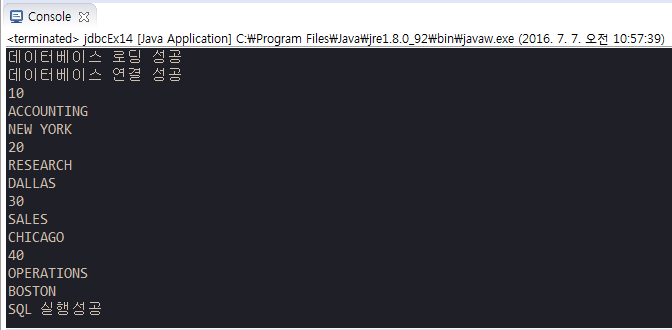
//자바에서 프로시저 값을 커서로 출력함
import java.sql.CallableStatement;
import java.sql.Connection;
import java.sql.DriverManager;
import java.sql.ResultSet;
import java.sql.SQLException;

import oracle.jdbc.internal.OracleCallableStatement;
import oracle.jdbc.internal.OracleTypes;

public class jdbcEx14 {

 public static void main(String[] args) {
  String url = "jdbc:oracle:thin:@127.0.0.1:1521:orcl";
  String user = "scott";
  String password = "tiger";
  
  Connection conn = null;
  CallableStatement cstmt = null; //프로시저를 실행하기위함
  OracleCallableStatement ocstmt = null;
  ResultSet rs = null; //데이터를 가져오기 위함
  
  try {
   Class.forName("oracle.jdbc.driver.OracleDriver");
   System.out.println("데이터베이스 로딩 성공");
   
   conn = DriverManager.getConnection(url, user, password);
   System.out.println("데이터베이스 연결 성공");
   
   cstmt = conn.prepareCall("call callable5(?)");
   cstmt.registerOutParameter(1, OracleTypes.CURSOR);
   
   cstmt.executeUpdate();
   
   ocstmt = (OracleCallableStatement)cstmt;
   rs = ocstmt.getCursor(1);
   
   while(rs.next()){
    System.out.println(rs.getString("deptno"));
    System.out.println(rs.getString("dname"));
    System.out.println(rs.getString("loc"));
   }

   System.out.println("SQL 실행성공");
   
  } catch (ClassNotFoundException e) {
   System.out.println("[에러] : "+e.getMessage());
  } catch (SQLException e) {
   System.out.println("[에러] : "+e.getMessage());
  } finally {
   if(ocstmt != null) try { ocstmt.close(); } catch(SQLException e){}
   if(rs != null) try { rs.close(); } catch(SQLException e){}
   if(conn != null) try { conn.close(); } catch(SQLException e){}
   if(cstmt != null) try { cstmt.close(); } catch(SQLException e){}
  }
 }

}


4
--출력결과가 여러행일 경우 커서로 받는 프로시저 입력값 추가
create or replace procedure callable6 (
 v_deptno  in emp.deptno%type,
 v_result out sys_refcursor
)
is

begin
 open v_result for
  select *
  from emp
  where deptno = v_deptno;

end;
/


SQL> @c:\oracle\callable6
SQL> var g_rc refcursor
SQL> exec callable6(10, :g_rc)
SQL> print :g_rc


import java.sql.CallableStatement;
import java.sql.Connection;
import java.sql.DriverManager;
import java.sql.ResultSet;
import java.sql.SQLException;

import oracle.jdbc.internal.OracleCallableStatement;
import oracle.jdbc.internal.OracleTypes;

public class jdbcEx15 {

 public static void main(String[] args) {
  String url = "jdbc:oracle:thin:@127.0.0.1:1521:orcl";
  String user = "scott";
  String password = "tiger";
  
  Connection conn = null;
  CallableStatement cstmt = null; //프로시저를 실행하기위함
  OracleCallableStatement ocstmt = null;
  ResultSet rs = null; //데이터를 가져오기 위함
  
  try {
   Class.forName("oracle.jdbc.driver.OracleDriver");
   System.out.println("데이터베이스 로딩 성공");
   
   conn = DriverManager.getConnection(url, user, password);
   System.out.println("데이터베이스 연결 성공");
   
   cstmt = conn.prepareCall("call callable6(?,?)");
   
   cstmt.setString(1, "10");
   cstmt.registerOutParameter(2, OracleTypes.CURSOR);
   
   cstmt.executeUpdate();
   
   ocstmt = (OracleCallableStatement)cstmt;
   rs = ocstmt.getCursor(2);
   
   while(rs.next()){
    System.out.println(rs.getString("empno"));
    System.out.println(rs.getString("ename"));
    System.out.println(rs.getString("sal"));
   }

   System.out.println("SQL 실행성공");
   
  } catch (ClassNotFoundException e) {
   System.out.println("[에러] : "+e.getMessage());
  } catch (SQLException e) {
   System.out.println("[에러] : "+e.getMessage());
  } finally {
   if(ocstmt != null) try { ocstmt.close(); } catch(SQLException e){}
   if(rs != null) try { rs.close(); } catch(SQLException e){}
   if(conn != null) try { conn.close(); } catch(SQLException e){}
   if(cstmt != null) try { cstmt.close(); } catch(SQLException e){}
  }
 }

}


5
--외부에서 sql자체를 받아드림
create or replace procedure callable7 (
 v_sql  in varchar2,
 v_result out sys_refcursor
)
is

begin
 open v_result for v_sql;

end;
/

--select 문장없이 프로시저 실행됨
SQL> @c:\oracle\callable7
SQL> exec callable7('select * from emp where deptno=10', :g_rc)
--select 문을 프로시저 안에 써줌
SQL> print :g_rc


6
//자바에서 동이름을 입력받고 데이터베이스 테이블로 바로 접속해서 주소정보 가져오기
import java.sql.CallableStatement;
import java.sql.Connection;
import java.sql.DriverManager;
import java.sql.PreparedStatement;
import java.sql.ResultSet;
import java.sql.SQLException;
import java.util.Scanner;

import oracle.jdbc.internal.OracleCallableStatement;
import oracle.jdbc.internal.OracleTypes;

public class zipSearch {

 public static void main(String[] args) {
  //동이름 입력받기
  Scanner scan = new Scanner(System.in);
  System.out.println("동이름 입력: ");
  String dong = scan.next();
  scan.close();
  
  //데이터베이스 접속하기
  String url = "jdbc:oracle:thin:@127.0.0.1:1521:orcl";
  String user = "scott";
  String password = "tiger";
  
  Connection conn = null;
  PreparedStatement pstmt = null;
  ResultSet rs = null; //데이터를 가져오기 위함
  
  try {
   Class.forName("oracle.jdbc.driver.OracleDriver");
   System.out.println("데이터베이스 로딩 성공");
   
   conn = DriverManager.getConnection(url, user, password);
   System.out.println("데이터베이스 연결 성공");
   //sql문 준비하기
   String sql = "select * from zipcode where dong like ?";
   pstmt = conn.prepareStatement(sql);
   pstmt.setString(1, dong+"%");
   
   //여러행을 입력받아야 함으로 ResultSet 실행하기   
   rs = pstmt.executeQuery();
   while(rs.next()){
    System.out.print("["+rs.getString("zipcode")+"]\t");
    System.out.print(rs.getString("sido")+"\t");
    System.out.print(rs.getString("dong")+"\t");
    System.out.print(rs.getString("ri")==null?"":rs.getString("ri")+"\t");
    System.out.print(rs.getString("bunji")==null?"":rs.getString("bunji")+"\t");
    System.out.println(rs.getString("seq"));
   }

   System.out.println("SQL 실행성공");
   
  } catch (ClassNotFoundException e) {
   System.out.println("[에러] : "+e.getMessage());
  } catch (SQLException e) {
   System.out.println("[에러] : "+e.getMessage());
  } finally {
   if(rs != null) try { rs.close(); } catch(SQLException e){}
   if(conn != null) try { conn.close(); } catch(SQLException e){}
   if(pstmt != null) try { pstmt.close(); } catch(SQLException e){}
  }
 }

}


7
--동이름 입력받아 zipcode검색 프로시저
create or replace procedure zipsearchcall (
 v_dong  in varchar2,
 v_result out sys_refcursor
)
is
 --v_dong2 zipcode.dong%type
begin
 --v_dong2 := v_dong || '%';  --%처리를 프로시저에서 해도 되고 자바에서 해도 됨
 open v_result for
  select *
  from zipcode
  where dong like v_dong;

end;
/

--sqlplus 프로시저 실행확인
SQL> @c:\oracle\zipSearchCall
SQL> var g_rc refcursor
SQL> exec ZipSearchCall('개포4%', :g_rc)
SQL> print :g_rc

//자바에서 동이름 입력받고 데이터베이스 프로시저를 통해서 주소 가져오기
import java.sql.CallableStatement;
import java.sql.Connection;
import java.sql.DriverManager;
import java.sql.PreparedStatement;
import java.sql.ResultSet;
import java.sql.SQLException;
import java.util.Scanner;

import oracle.jdbc.internal.OracleCallableStatement;
import oracle.jdbc.internal.OracleTypes;

public class zipSearchCallable {

 public static void main(String[] args) {
  //동이름 입력받기
  Scanner scan = new Scanner(System.in);
  System.out.println("동이름 입력: ");
  String dong = scan.next();
  scan.close();
  
  //데이터베이스 접속하기
  String url = "jdbc:oracle:thin:@127.0.0.1:1521:orcl";
  String user = "scott";
  String password = "tiger";
  
  Connection conn = null;
  CallableStatement cstmt = null; //프로시저를 실행하기위함
  OracleCallableStatement ocstmt = null;
  ResultSet rs = null; //데이터를 가져오기 위함
  
  try {
   Class.forName("oracle.jdbc.driver.OracleDriver");
   System.out.println("데이터베이스 로딩 성공");
   
   conn = DriverManager.getConnection(url, user, password);
   System.out.println("데이터베이스 연결 성공");
   //sql문 준비하기
   cstmt = conn.prepareCall("call ZipSearchCall(?,?)");
   cstmt.setString(1, dong+"%");
   cstmt.registerOutParameter(2, OracleTypes.CURSOR);
   
   //여러행을 입력받아야 함으로 CallableStatement, ResultSet 실행하기   
   cstmt.executeUpdate();
   ocstmt = (OracleCallableStatement)cstmt;
   rs = ocstmt.getCursor(2);
   
   while(rs.next()){
    System.out.print("["+rs.getString("zipcode")+"]\t");
    System.out.print(rs.getString("sido")+"\t");
    System.out.print(rs.getString("dong")+"\t");
    System.out.print(rs.getString("ri")==null?"":rs.getString("ri")+"\t"); //null일 경우 공백
    System.out.print(rs.getString("bunji")==null?"":rs.getString("bunji")+"\t");
    System.out.println(rs.getString("seq"));
   }

   System.out.println("SQL 실행성공");
   
  } catch (ClassNotFoundException e) {
   System.out.println("[에러] : "+e.getMessage());
  } catch (SQLException e) {
   System.out.println("[에러] : "+e.getMessage());
  } finally {
   if(rs != null) try { rs.close(); } catch(SQLException e){}
   if(conn != null) try { conn.close(); } catch(SQLException e){}
   if(cstmt != null) try { cstmt.close(); } catch(SQLException e){}
   if(ocstmt != null) try { ocstmt.close(); } catch(SQLException e){}
  }
 }

}


8
import java.net.InetAddress;
import java.net.UnknownHostException;

public class NetWorkEx01 {

 public static void main(String[] args) {
  // 자바 네트워크 Inet
  try {
   InetAddress address = InetAddress.getByName("www.google.co.kr");
   System.out.println(address.getHostName());
   System.out.println(address.getHostAddress());  //구글의 아이피 주소 가져오기
   
   InetAddress[] addresses = InetAddress.getAllByName("www.naver.com"); //아이피 주소가 여러개일 수 있음
   for(InetAddress address1 : addresses){
    System.out.println(address1.getHostName());
    System.out.println(address1.getHostAddress());
   }
  } catch (UnknownHostException e) {
   // 잘못된 주소일 경우 처리
   e.printStackTrace();
  }
 }

}


9
import java.net.MalformedURLException;
import java.net.URL;

public class NetWorkEx02 {

 public static void main(String[] args) {
  // URL을 분석해서 내용 보여줌
  try {
   URL url = new URL("http://www.naver.com:80/index.html");
   //URL문장을 의미있는 단위로 나눠서 보여줌
   System.out.println(url.getDefaultPort());
   System.out.println(url.getPort());
   System.out.println(url.getFile());
   System.out.println(url.getHost());
   System.out.println(url.getPath());
   System.out.println(url.getProtocol());
   System.out.println(url.getQuery());
  } catch (MalformedURLException e) {
   // TODO Auto-generated catch block
   e.printStackTrace();
  }
 }

}


10
import java.io.BufferedReader;
import java.io.IOException;
import java.io.InputStreamReader;
import java.net.MalformedURLException;
import java.net.URL;

public class NetWorkEx03 {

 public static void main(String[] args) {
  // URL 연결하고 BufferedReader로 페이지 HTML문서 읽기
  BufferedReader br = null;
  try {
   URL url = new URL("http://m.naver.com:80/index.html");
   
   br = new BufferedReader(new InputStreamReader(url.openStream()));
   String line = "";
   while((line = br.readLine()) != null){
    System.out.println(line);
   }
  } catch (MalformedURLException e) {
   // TODO Auto-generated catch block
   e.printStackTrace();
  } catch (IOException e) {
   // TODO Auto-generated catch block
   e.printStackTrace();
  } finally {
   if(br != null) try{ br.close();} catch(IOException e){}
  }
 }

}


11. 데이터를 제공해주는 사이트

  • OPEN API
    • 구글 - 맵데이터
      • 개발자 센터
      • developer.google.com
        • 지역명 입력→ 위도, 경도 , 주소
    • 공공데이터 포털
      • data.go.kr
    • 형태
      • XML
        • ex)https://developers.google.com/maps/documentation/geocoding/intro
        • https://maps.googleapis.com/maps/api/geocode/xml?address=서울시청
      • JSON
      • 라이브러리
    • MASHUP 사이트
      • API를 이용해서 부가가치가 있는 서비스를 만듦


12
import java.io.BufferedReader;
import java.io.IOException;
import java.io.InputStreamReader;
import java.net.MalformedURLException;
import java.net.URL;

public class NetWorkEx03 {

 public static void main(String[] args) {
  // OPEN API에 데이터를 받아오기
  BufferedReader br = null;
  try {
   //%EA%B0%95%EB%82%A8%EC%97%AD : 크롬에서는 강남역 자동인코딩 시켜줌
   URL url = new URL("https://maps.googleapis.com/maps/api/geocode/xml?address=강남역"); //xml은 HTML 태그로 표현 //json은 자바 객체 표현
   
   br = new BufferedReader(new InputStreamReader(url.openStream()));
   String line = "";
   while((line = br.readLine()) != null){
    System.out.println(line);
   }
  } catch (MalformedURLException e) {
   // TODO Auto-generated catch block
   e.printStackTrace();
  } catch (IOException e) {
   // TODO Auto-generated catch block
   e.printStackTrace();
  } finally {
   if(br != null) try{ br.close();} catch(IOException e){}
  }
 }

}


13
import java.io.IOException;
import java.net.MalformedURLException;
import java.net.URL;
import java.net.URLConnection;
import java.util.Date;

public class NetWorkEx04 {

 public static void main(String[] args) {
  // 이미지 소스복사후 정보 가져오기
  try {
   URL url = new URL("http://img.naver.net/static/newsstand/up/2014/0715/326.gif");
   URLConnection conn = url.openConnection();
   System.out.println(conn.getContentType());  //이미지 타입
   System.out.println(new Date(conn.getLastModified()).toLocaleString());  //마지막 수정일
   System.out.println(conn.getContentLength());
   System.out.println(conn.getContentEncoding());
  } catch (MalformedURLException e) {
   // TODO Auto-generated catch block
   e.printStackTrace();
  } catch (IOException e) {
   // TODO Auto-generated catch block
   e.printStackTrace();
  }
 }

}


14
import java.io.BufferedInputStream;
import java.io.BufferedOutputStream;
import java.io.FileOutputStream;
import java.io.IOException;
import java.net.MalformedURLException;
import java.net.URL;
import java.net.URLConnection;
import java.util.Date;

public class NetWorkEx05 {

 public static void main(String[] args) {
  // 이미지 소스로 이미지 저장  //다른이름으로 사진저장과 똑같은 기능 만들기
  BufferedInputStream bis = null;
  BufferedOutputStream bos = null;
  try {
   URL url = new URL("http://img.naver.net/static/newsstand/up/2014/0715/326.gif");
   URLConnection conn = url.openConnection();
   
   bis = new BufferedInputStream(conn.getInputStream());
   bos = new BufferedOutputStream(new FileOutputStream("c:/java/020.gif"));
   
   int data =0;
   while((data = bis.read())!=-1){
    bos.write(data);
   }
   System.out.println("전송이 완료되었습니다");
   
  } catch (MalformedURLException e) {
   // TODO Auto-generated catch block
   e.printStackTrace();
  } catch (IOException e) {
   // TODO Auto-generated catch block
   e.printStackTrace();
  } finally {
   if(bis != null) try{ bis.close();} catch(IOException e){}
   if(bos != null) try{ bos.close();} catch(IOException e){}
  }
 }

}


15
import java.awt.BorderLayout;
import java.awt.EventQueue;

import javax.swing.JFrame;
import javax.swing.JPanel;
import javax.swing.border.EmptyBorder;
import javax.swing.JTextField;
import javax.swing.JButton;
import javax.swing.JLabel;
import java.awt.event.MouseAdapter;
import java.awt.event.MouseEvent;
import java.io.BufferedReader;
import java.io.IOException;
import java.io.InputStreamReader;
import java.net.MalformedURLException;
import java.net.URL;

public class MapSearch extends JFrame {

 private JPanel contentPane;
 private JTextField textField;
 private JTextField textField_1;
 private JTextField textField_2;
 private JTextField textField_3;
 private JLabel label;
 private JLabel label_1;
 private JLabel label_2;

 /**
  * Launch the application.
  */
 public static void main(String[] args) {
  EventQueue.invokeLater(new Runnable() {
   public void run() {
    try {
     MapSearch frame = new MapSearch();
     frame.setVisible(true);
    } catch (Exception e) {
     e.printStackTrace();
    }
   }
  });
 }

 /**
  * Create the frame.
  */
 
 String juso = null;
 String lat = null;
 String lng = null;
 
 public MapSearch() {
  setDefaultCloseOperation(JFrame.EXIT_ON_CLOSE);
  setBounds(100, 100, 470, 262);
  contentPane = new JPanel();
  contentPane.setBorder(new EmptyBorder(5, 5, 5, 5));
  setContentPane(contentPane);
  contentPane.setLayout(null);
  
  textField = new JTextField();
  textField.setBounds(12, 10, 216, 21);
  contentPane.add(textField);
  textField.setColumns(10);
  
  JButton btnNewButton = new JButton("검색");
  btnNewButton.addMouseListener(new MouseAdapter() {
   @Override
   public void mouseClicked(MouseEvent arg0) {
    //텍스트에서 검색어 가져오기
    String el = textField.getText();
    BufferedReader br = null;
    
    try {
     //검색어로 URL검색후 HTML문서 가져오기  //한글주소로 가져오기위해 +"&language=ko"
     URL url = new URL("https://maps.googleapis.com/maps/api/geocode/xml?address="+el+"&language=ko");
     
     br = new BufferedReader(new InputStreamReader(url.openStream()));
     String line = "";
     while((line = br.readLine()) != null){
      if (line.indexOf("") != -1){ //주소 라인 읽기
       juso = line.replaceAll("","").replaceAll("", "").trim();
      }else if(line.indexOf("") != -1){//위도 라인 읽기
       lat = line.replaceAll("","").replaceAll("", "").trim();
      }else if(line.indexOf("") != -1){//경도 라인 읽기
       lng = line.replaceAll("","").replaceAll("", "").trim();
      }
     }
    } catch (MalformedURLException e) {
     // TODO Auto-generated catch block
     e.printStackTrace();
    } catch (IOException e) {
     // TODO Auto-generated catch block
     e.printStackTrace();
    } finally {
     if(br != null) try{ br.close();} catch(IOException e){}
    }
    //주소, 위도, 경도 텍스트 적기
    textField_1.setText(juso);
    textField_2.setText(lat);
    textField_3.setText(lng);
   }
  });
  btnNewButton.setBounds(240, 9, 97, 23);
  contentPane.add(btnNewButton);
  
  JButton btnNewButton_1 = new JButton("지도 보기");
  btnNewButton_1.addMouseListener(new MouseAdapter() {
   @Override
   public void mouseClicked(MouseEvent e) {
    try {
     //위도,경도 가져와서 지도 URL 만들기
     String url = String.format("https://www.google.co.kr/maps/@%s,%s,15z", lat, lng);
     //ProcessBuilder로 익스플로러 창 켜기
     new ProcessBuilder("C:/Program Files/Internet Explorer/iexplore.exe", url).start();
    } catch (IOException e1) {
     // TODO Auto-generated catch block
     e1.printStackTrace();
    }
   }
  });
  btnNewButton_1.setBounds(349, 9, 97, 23);
  contentPane.add(btnNewButton_1);
  
  textField_1 = new JTextField();
  textField_1.setBounds(12, 71, 430, 21);
  contentPane.add(textField_1);
  textField_1.setColumns(10);
  
  textField_2 = new JTextField();
  textField_2.setColumns(10);
  textField_2.setBounds(12, 129, 430, 21);
  contentPane.add(textField_2);
  
  textField_3 = new JTextField();
  textField_3.setColumns(10);
  textField_3.setBounds(12, 187, 430, 21);
  contentPane.add(textField_3);
  
  label = new JLabel("주소");
  label.setBounds(12, 46, 57, 23);
  contentPane.add(label);
  
  label_1 = new JLabel("위도");
  label_1.setBounds(12, 102, 57, 23);
  contentPane.add(label_1);
  
  label_2 = new JLabel("경도");
  label_2.setBounds(12, 160, 57, 23);
  contentPane.add(label_2);
 }
}


2016년 7월 6일 수요일

14day java

1

import java.sql.Connection;
import java.sql.DriverManager;
import java.sql.ResultSet;
import java.sql.SQLException;
import java.sql.Statement;

public class jdbcEx04 {

 public static void main(String[] args) {
  String url = "jdbc:oracle:thin:@192.168.0.19:1521:orcl";
  String user = "scott";
  String password = "tiger";
  
  Connection conn = null;
  Statement stmt = null;
  //select 문장을 사용하기 위해서 ResultSet만듦
  ResultSet rs = null;
  
  try {
   Class.forName("oracle.jdbc.driver.OracleDriver");
   System.out.println("데이터베이스 로딩 성공");
   
   conn = DriverManager.getConnection(url, user, password);
   System.out.println("데이터베이스 연결 성공");
   
   stmt = conn.createStatement();
   String sql = "select dname, loc, deptno + 10 deptno2 from dept";
   //executeUpdate 나머지 전부 처리함
   //executeQuery Select 만 처리함
   rs = stmt.executeQuery(sql);
   //Cursor를 프로그램화 시켜놓은게 ResultSet
   while(rs.next()) {
    //String deptno = rs.getString("deptno+10"); //컬럼을 계산해서 가져올 경우 바뀐 컬럼명을 적어야함
    //String deptno = rs.getString("deptno2");  //aliasing 된 컬럼명을 적어도 됨
    //String dname = rs.getString("dname");
    //String loc = rs.getString("loc");
    
    String deptno = rs.getString(3);  //컬럼 순서를 써도 됨
    String dname = rs.getString(1);
    String loc = rs.getString(2);
    
    System.out.printf("%s\t%s\t%s\n",deptno, dname, loc);
   }
   System.out.println("SQL 실행 성공");
   
  } catch (ClassNotFoundException e) {
   // TODO Auto-generated catch block
   System.out.println("[에러] : "+e.getMessage());
  } catch (SQLException e) {
   // TODO Auto-generated catch block
   System.out.println("[에러] : "+e.getMessage());
  } finally {
   if(rs != null) try { rs.close(); } catch(SQLException e){}
   if(stmt != null) try { stmt.close(); } catch(SQLException e){}
   if(conn != null) try { conn.close(); } catch(SQLException e){}
  }
 }

}


2

public class jdbcEx05 {

 public static void main(String[] args) {
  String url = "jdbc:oracle:thin:@127.0.0.1:1521:orcl"; //127.0.0.1 자신의 아이피만 사용
  String user = "scott";
  String password = "tiger";
  
  Connection conn = null;
  Statement stmt = null;
  ResultSet rs = null;
  
  //10번 부서의 사원정보를 출력 프로그램
  //출력결과:
  //사원번호 사원이름 급여 입사일(xxxx-xx-xx)
  try {
   Class.forName("oracle.jdbc.driver.OracleDriver");
   System.out.println("데이터베이스 로딩 성공");
   
   conn = DriverManager.getConnection(url, user, password);
   System.out.println("데이터베이스 연결 성공");
   
   stmt = conn.createStatement();
   //String sql = "select empno, ename, sal, to_char(hiredate, 'YYYY-MM-DD') from emp";  
   //DB에서 처리
   String sql = "select empno, ename, sal, hiredate from emp"; 
   rs = stmt.executeQuery(sql);
   
   while(rs.next()) {
    
    String empno = rs.getString(1);  
    String ename = rs.getString(2);
    String sal = rs.getString(3);
    String hiredate = rs.getString(4);
    
    //System.out.printf("%s\t %s\t %s\t (%s)\n",empno, ename, sal, hiredate);
    System.out.printf("%s\t %s\t %s\t (%s)\n",empno, ename, sal, hiredate.substring(0, 10)); 
           //JAVA에서 처리
   }
   System.out.println("SQL 실행 성공");
   
  } catch (ClassNotFoundException e) {
   System.out.println("[에러] : "+e.getMessage());
  } catch (SQLException e) {
   System.out.println("[에러] : "+e.getMessage());
  } finally {
   if(rs != null) try { rs.close(); } catch(SQLException e){}
   if(stmt != null) try { stmt.close(); } catch(SQLException e){}
   if(conn != null) try { conn.close(); } catch(SQLException e){}
  }
 }

}


3.
cmd에서 클래스 파일을 실행시키려고 하는 경우 경로 지정을 잘 해주어야 한다.
이클립스는 자동으로 클래스 파일을 찾아서 실행시키지만 직접 실행 시키려고 하는 경우 경로 설정을 잘 해야함
복사해둔 ojdbc6.jar에 classpath를 설정해서 실행해야함


4
import java.sql.Connection;
import java.sql.DriverManager;
import java.sql.PreparedStatement;
import java.sql.SQLException;

public class jdbcEx06 {

 public static void main(String[] args) {

  String url = "jdbc:oracle:thin:@127.0.0.1:1521:orcl";
  String user = "scott";
  String password = "tiger";
  
  Connection conn = null;
  PreparedStatement pstmt = null;

  try {
   Class.forName("oracle.jdbc.driver.OracleDriver");
   System.out.println("데이터베이스 로딩 성공");
   
   conn = DriverManager.getConnection(url, user, password);
   System.out.println("데이터베이스 연결 성공");
   
   //문자열 = '' 없음 // 문자, 숫자 무조건 ?
   //String sql = "insert into dept values (?,?,?)"; 
   //pstmt = conn.prepareStatement(sql);  //미리 구문을 준비함
   //pstmt.setInt(1, 95); //문자열로 집어넣어도 자동 형변환
   //pstmt.setString(2, "영업");
   //pstmt.setString(3, "서울");
   String sql = "update dept set loc = ? where deptno=?";
   pstmt = conn.prepareStatement(sql);
   pstmt.setString(1, "강남");
   pstmt.setString(2, "95");
   
   
   //sql 매개변수없이 실행됨
   pstmt.executeUpdate();
   System.out.println("SQL 실행 성공");
   
  } catch (ClassNotFoundException e) {
   // TODO Auto-generated catch block
   System.out.println("[에러] : "+e.getMessage());
  } catch (SQLException e) {
   // TODO Auto-generated catch block
   System.out.println("[에러] : "+e.getMessage());
  } finally {
   if(pstmt != null) try { pstmt.close(); } catch(SQLException e){}
   if(conn != null) try { conn.close(); } catch(SQLException e){}
  }
 }

}


5
import java.sql.Connection;
import java.sql.DriverManager;
import java.sql.PreparedStatement;
import java.sql.ResultSet;
import java.sql.SQLException;

public class jdbcEx07 {

 public static void main(String[] args) {

  String url = "jdbc:oracle:thin:@127.0.0.1:1521:orcl";
  String user = "scott";
  String password = "tiger";
  
  Connection conn = null;
  PreparedStatement pstmt = null;
  ResultSet rs = null;

  try {
   Class.forName("oracle.jdbc.driver.OracleDriver");
   System.out.println("데이터베이스 로딩 성공");
   
   conn = DriverManager.getConnection(url, user, password);
   System.out.println("데이터베이스 연결 성공");
   
   //9로 시작하는 부서를 검색
   //String sql = "select * from dept where deptno like ?%"; //에러남 //물음표를 % 기호로 묶어 줄수 없음
   String sql = "select * from dept where deptno like ?";
   pstmt = conn.prepareStatement(sql);
   //pstmt.setString(1, "95");
   pstmt.setString(1, "9%");
   
   rs = pstmt.executeQuery();
   while(rs.next()){
    String deptno = rs.getString("deptno"); 
    String dname = rs.getString("dname");
    String loc = rs.getString("loc");
    
    System.out.printf("%s\t%s\t%s\n",deptno, dname, loc);
   }
   
   //sql 매개변수없이 실행됨
   pstmt.executeUpdate();
   System.out.println("SQL 실행 성공");
   
  } catch (ClassNotFoundException e) {
   System.out.println("[에러] : "+e.getMessage());
  } catch (SQLException e) {
   System.out.println("[에러] : "+e.getMessage());
  } finally {
   if(rs != null) try { rs.close(); } catch(SQLException e){}
   if(pstmt != null) try { pstmt.close(); } catch(SQLException e){}
   if(conn != null) try { conn.close(); } catch(SQLException e){}
  }
 }

}


6
//데이터베이스에 주소테이블이 있으면 데이터 삭제하고 없으면 테이블 생성하여 
//zipcode.scv 파일에있는 데이터를 읽어서 데이터베이스에 입력
import java.io.BufferedReader;
import java.io.FileNotFoundException;
import java.io.FileReader;
import java.io.IOException;
import java.sql.Connection;
import java.sql.DriverManager;
import java.sql.PreparedStatement;
import java.sql.ResultSet;
import java.sql.SQLException;
import java.sql.Statement;
import java.util.ArrayList;

public class jdbcZipcode {

 public static void main(String[] args) {

  String url = "jdbc:oracle:thin:@127.0.0.1:1521:orcl";
  String user = "scott";
  String password = "tiger";
  
  Connection conn = null;
  PreparedStatement pstmt = null;
  ResultSet rs = null;
  
  try {
   Class.forName("oracle.jdbc.driver.OracleDriver");
   System.out.println("데이터베이스 로딩 성공");
   
   conn = DriverManager.getConnection(url, user, password);
   System.out.println("데이터베이스 연결 성공");
   
   //확인할 테이블 이름 설정
   String name = "ZIPCODE";
   
   //zipcode 테이블이 있는지 검사
   String sql = "select tname from tab where tname = ?";
   pstmt = conn.prepareStatement(sql);
   pstmt.setString(1, name);
   
   rs = pstmt.executeQuery();
   //IF문에서 쓰기위해 while 문 밖에서 선언함
   String tname =null;
   while(rs.next()){
    tname = rs.getString("tname");  //sql문 조건이 만족하는 테이블 명이 있으면 tname 변수에 집어넣음
   }
   
   //테이블 있는지 검사
   if(tname != null){
    System.out.println("테이블이 있음");
    //테이블 내용 삭제
    String sql_2 = "delete from " +name;
    pstmt = conn.prepareStatement(sql_2);
    pstmt.executeUpdate();
    System.out.println("테이블 데이터 삭제완료");
   }else{
    System.out.println("테이블이 없음");
    String sql_2 = "create table " +name+"(zipcode char(7),sido varchar2(6), gugun varchar2(27),"
         + "dong varchar2(39),ri varchar(67),bunji varchar2(18), seq number(5))";
    pstmt = conn.prepareStatement(sql_2);
    pstmt.executeUpdate();
    System.out.println("테이블형태 생성완료");
   }
   
   //데이터 읽고 데이터베이스에 쓰기
         BufferedReader br = null;

         try {
    br = new BufferedReader(new FileReader("C:/java/workspace/ZipSearch/src/zipcode_seoul_utf8.csv"));
    String line = "";
    String sql_3 = "insert into " + name +" values(?,?,?,?,?,?,?)";
    pstmt = conn.prepareStatement(sql_3);
    while((line = br.readLine()) != null){
        String[] address = line.split(",");
     pstmt.setString(1, address[0]);
     pstmt.setString(2, address[1]);
     pstmt.setString(3, address[2]);
     pstmt.setString(4, address[3]);
     pstmt.setString(5, address[4]);
     pstmt.setString(6, address[5]);
     pstmt.setString(7, address[6]);
     pstmt.executeUpdate();
    }
    System.out.println("테이블 데이터 삽입완료");
   } catch (FileNotFoundException e) {
    // TODO Auto-generated catch block
    e.printStackTrace();
   } catch (IOException e) {
    // TODO Auto-generated catch block
    e.printStackTrace();
   } finally {
    if(br != null) try { br.close(); } catch(IOException e){}
   }
   
   
   System.out.println("SQL 실행 성공");
   
  } catch (ClassNotFoundException e) {
   System.out.println("[에러] : "+e.getMessage());
  } catch (SQLException e) {
   System.out.println("[에러] : "+e.getMessage());
  } finally {
   if(rs != null) try { rs.close(); } catch(SQLException e){}
   if(pstmt != null) try { pstmt.close(); } catch(SQLException e){}
   if(conn != null) try { conn.close(); } catch(SQLException e){}
  }
 }

}


7

import java.sql.Connection;
import java.sql.DatabaseMetaData;
import java.sql.DriverManager;
import java.sql.SQLException;

public class jdbcEx08 {

 public static void main(String[] args) {
  String url = "jdbc:oracle:thin:@127.0.0.1:1521:orcl";
  String user = "scott";
  String password = "tiger";
  
  Connection conn = null;

  try {
   Class.forName("oracle.jdbc.driver.OracleDriver");
   System.out.println("데이터베이스 로딩 성공");
   
   conn = DriverManager.getConnection(url, user, password);
   System.out.println("데이터베이스 연결 성공");
   
   //데이터베이스 기본 속성값 보기
   DatabaseMetaData dmd = conn.getMetaData();
   
   System.out.println(dmd.getDatabaseProductName());
   System.out.println(dmd.getDatabaseProductVersion());
   
   System.out.println(dmd.getDriverName());
   System.out.println(dmd.getDriverVersion());
   
   System.out.println(dmd.getURL());
   System.out.println(dmd.getUserName());
   
   
  } catch (ClassNotFoundException e) {
   // TODO Auto-generated catch block
   System.out.println("[에러] : "+e.getMessage());
  } catch (SQLException e) {
   // TODO Auto-generated catch block
   System.out.println("[에러] : "+e.getMessage());
  } finally {
   if(conn != null) try { conn.close(); } catch(SQLException e){}
  }
 }

}


8
import java.sql.Connection;
import java.sql.DriverManager;
import java.sql.PreparedStatement;
import java.sql.ResultSet;
import java.sql.ResultSetMetaData;
import java.sql.SQLException;

public class jdbcEx09 {

 public static void main(String[] args) {

  String url = "jdbc:oracle:thin:@127.0.0.1:1521:orcl";
  String user = "scott";
  String password = "tiger";
  
  Connection conn = null;
  PreparedStatement pstmt = null;
  ResultSet rs = null;

  try {
   Class.forName("oracle.jdbc.driver.OracleDriver");
   System.out.println("데이터베이스 로딩 성공");
   
   conn = DriverManager.getConnection(url, user, password);
   System.out.println("데이터베이스 연결 성공");
   
   String sql = "select * from emp";
   pstmt = conn.prepareStatement(sql);
   rs = pstmt.executeQuery();
   
   ResultSetMetaData rsmd = rs.getMetaData();
   System.out.println("컬럼갯수 :"+rsmd.getColumnCount()); //컬럼갯수 확인
   
   for(int i=1; i<=rsmd.getColumnCount();i++){
    /*System.out.println(rsmd.getColumnName(i));
    System.out.println(rsmd.getColumnTypeName(i));
    System.out.println(rsmd.getPrecision(i));   //몇자리 숫자
    System.out.println(rsmd.getScale(i));       // 소수점 몇자
    System.out.println(rsmd.isNullable(i));
    System.out.println();*/
    String columnName = rsmd.getColumnName(i);
    String isNull = rsmd.isNullable(i) ==0? "NOT NULL": "";
    String columnType = rsmd.getColumnTypeName(i);
    String columnSize = "("+rsmd.getPrecision(i) +
      (rsmd.getScale(i)==0?"":", " +rsmd.getScale(i))+")" ;
    
    System.out.printf("%-15s%-10s%s%s\n",columnName,isNull,columnType,columnSize);
    //%-15s : 15칸을 차지
   }
   
   System.out.println("SQL 실행 성공");
  } catch (ClassNotFoundException e) {
   System.out.println("[에러] : "+e.getMessage());
  } catch (SQLException e) {
   System.out.println("[에러] : "+e.getMessage());
  } finally {
   if(rs != null) try { rs.close(); } catch(SQLException e){}
   if(pstmt != null) try { pstmt.close(); } catch(SQLException e){}
   if(conn != null) try { conn.close(); } catch(SQLException e){}
  }
 }

}


9
create or replace procedure callable1 (
 v_result out varchar2
)
is
 v_empno  emp2.empno%type := 7708;
 v_ename  emp2.ename%type := '홍길동';
 v_job  emp2.job%type := '개발';
 v_mgr  emp2.mgr%type := 1000;
 v_hiredate emp2.hiredate%type := '16/01/01';
 v_sal  emp2.sal%type := 3000;
 v_comm  emp2.comm%type := 500;
 v_deptno emp2.deptno%type := 10;
begin
 insert into emp2 values (v_empno, v_ename, v_job, v_mgr, v_hiredate, v_sal, v_comm, v_deptno);

 v_result := sql%rowcount || ' 행이 입력되었습니다.';

 commit;
end;
/


SQL> @c:\oracle\callable1
SQL> var g_result varchar2(4000)
SQL> exec callable1(:g_result)
SQL> print :g_result
SQL> select * from emp2;


import java.sql.CallableStatement;
import java.sql.Connection;
import java.sql.DriverManager;
import java.sql.SQLException;

import oracle.jdbc.internal.OracleTypes;

public class jdbcEx10 {

 public static void main(String[] args) {
  String url = "jdbc:oracle:thin:@127.0.0.1:1521:orcl";
  String user = "scott";
  String password = "tiger";
  
  Connection conn = null;
  CallableStatement cstmt = null; //프로시저를 실행하기위함
  
  try {
   Class.forName("oracle.jdbc.driver.OracleDriver");
   System.out.println("데이터베이스 로딩 성공");
   
   conn = DriverManager.getConnection(url, user, password);
   System.out.println("데이터베이스 연결 성공");
   
   cstmt = conn.prepareCall("call callable1(?)");
   cstmt.registerOutParameter(1, OracleTypes.VARCHAR);  //리턴타입 varchar
   cstmt.executeUpdate();
   
   System.out.println(cstmt.getString(1));
   System.out.println("SQL 실행성공");
   
   
  } catch (ClassNotFoundException e) {
   System.out.println("[에러] : "+e.getMessage());
  } catch (SQLException e) {
   System.out.println("[에러] : "+e.getMessage());
  } finally {
   if(conn != null) try { conn.close(); } catch(SQLException e){}
   if(cstmt != null) try { cstmt.close(); } catch(SQLException e){}
  }
 }

}


10
create or replace procedure callable2 (
 v_ename  out emp.ename%type,
 v_sal  out emp2.sal%type
)
is

begin
 select ename,sal
 into v_ename, v_sal
 from emp
 where empno=7788;

end;
/


SQL> @c:\oracle\callable2
SQL> var g_ename varchar2(10)
SQL> var g_sal number
SQL> exec callable2(:g_ename, :g_sal)
SQL> print :g_ename :g_sal


import java.sql.CallableStatement;
import java.sql.Connection;
import java.sql.DriverManager;
import java.sql.SQLException;

import oracle.jdbc.internal.OracleTypes;

public class jdbcEx11 {

 public static void main(String[] args) {
  String url = "jdbc:oracle:thin:@127.0.0.1:1521:orcl";
  String user = "scott";
  String password = "tiger";
  
  Connection conn = null;
  CallableStatement cstmt = null; //프로시저를 실행하기위함
  
  try {
   Class.forName("oracle.jdbc.driver.OracleDriver");
   System.out.println("데이터베이스 로딩 성공");
   
   conn = DriverManager.getConnection(url, user, password);
   System.out.println("데이터베이스 연결 성공");
   
   cstmt = conn.prepareCall("call callable2(?,?)");
   cstmt.registerOutParameter(1, OracleTypes.VARCHAR);
   cstmt.registerOutParameter(2, OracleTypes.VARCHAR);
   
   cstmt.executeUpdate();
   
   String ename = cstmt.getString(1);
   String sal = cstmt.getString(2);
   
   System.out.println(ename);
   System.out.println(sal);
   
   System.out.println("SQL 실행성공");
   
  } catch (ClassNotFoundException e) {
   System.out.println("[에러] : "+e.getMessage());
  } catch (SQLException e) {
   System.out.println("[에러] : "+e.getMessage());
  } finally {
   if(conn != null) try { conn.close(); } catch(SQLException e){}
   if(cstmt != null) try { cstmt.close(); } catch(SQLException e){}
  }
 }

}


11. 주소 데이터베이스에 넣기 teacher version
import java.sql.Connection;
import java.sql.DriverManager;
import java.sql.PreparedStatement;
import java.sql.ResultSet;
import java.sql.SQLException;

public class ZipSearch {
 private Connection conn = null;
 
 public ZipSearch() {
  String url = "jdbc:oracle:thin:@127.0.0.1:1521:orcl";
  String user = "scott";
  String password = "tiger";
  
  try {
   Class.forName("oracle.jdbc.driver.OracleDriver");
   System.out.println("데이터베이스 로딩 성공");

   this.conn = DriverManager.getConnection(url, user, password);
   System.out.println("데이터베이스 연결 성공");
   
  } catch (ClassNotFoundException e) {
   // TODO Auto-generated catch block
   System.out.println("[에러] : " + e.getMessage());
  } catch (SQLException e) {
   // TODO Auto-generated catch block
   System.out.println("[에러] : " + e.getMessage());
  }
 }
 
 public boolean isTable(String tableName) {
  PreparedStatement pstmt = null;
  ResultSet rs = null;
  boolean result = false;
  try {
   String sql = "select count(*) from tab where tabtype=? and tname=?";
   pstmt = conn.prepareStatement(sql);
   pstmt.setString(1, "TABLE");
   pstmt.setString(2, tableName.toUpperCase());
   
   rs = pstmt.executeQuery();
   if(rs.next()) {
    if(rs.getInt(1) == 0) {
     result = true;
    }
   }
  } catch (SQLException e) {
   // TODO Auto-generated catch block
   System.out.println("[에러] : " + e.getMessage());
  } finally {
   if(rs != null) try { rs.close(); } catch(SQLException e) {}
   if(pstmt != null) try { pstmt.close(); } catch(SQLException e) {}
  }
  return result;
 }
 
 public void close() {
  if(this.conn != null) try { this.conn.close(); } catch(SQLException e) {}
 }
}


public class ZipSearchMain {

 public static void main(String[] args) {
  // TODO Auto-generated method stub
  ZipSearch zipSearch = new ZipSearch();
  
  if(zipSearch.isTable("emp1")) {
   System.out.println("테이블이 존재하지 않습니다.");
  } else {
   System.out.println("테이블이 존재합니다.");
  }
  
  zipSearch.close();
 }

}


12


2016년 7월 5일 화요일

13day java

데이터처리기술
오라클SQL- 오라클 내부의 데이터 조작 방법


자바에서 데이터란
  • 임시
    • 변수/ 상수
  • 영구
    • 로컬
      • 파일
    • 원격
      • 데이터베이스
      • JDBC : 자바에서 데이터베이스 프로그램 다루는 기술
        1. 데이터베이스 연결 프로그램 파일찾아, 인스턴스 생성
        2. 연결 관리 CONNECTION 객체 생성
        3. 작업 처리할 Statement, preparedStatement, CallableStatement 객체 생성
        4. ResultSet 객체를 통한 Query 결과 처리
        5. 접속 종료
    • java → java.sql →database driver →데이터베이스
    •                     →database driver →데이터베이스
      • database driver는 데이터베이스 업체에서 제공함
        오라클용 database driver찾으려면 오라클 폴더에서 찾아야함

1
import java.sql.Connection;
import java.sql.DriverManager;
import java.sql.SQLException;

public class jdbcEx01 {

 public static void main(String[] args) {
  try {
   // 드라이버클래스 로딩
   Class.forName("oracle.jdbc.driver.OracleDriver");
   System.out.println("데이터베이스 로딩 성공");
  } catch (ClassNotFoundException e) {
   // TODO Auto-generated catch block
   System.out.println("[에러] : "+e.getMessage());
  }
  
  //String url = "jdbc:oracle:thin:@서버아이피:서버포트:오라클sid";
  //서버포트 C:/app/user/product/11.2.0/dbhome_1/NETWORK/ADMIN/listener 파일에서 확인
  // 127.0.0.1 아이피는 자신만 사용
  String url = "jdbc:oracle:thin:@192.168.0.80:1521:orcl";
  String user = "scott";
  String password = "tiger";
  
  Connection conn = null;
  try {
   //데이터 베이스 접속
   conn = DriverManager.getConnection(url, user, password);
   System.out.println("데이터베이스 연결 성공");
  } catch (SQLException e) {
   // TODO Auto-generated catch block
   System.out.println("[에러] : "+e.getMessage());
  } finally {
   if(conn != null) try { conn.close(); } catch(SQLException e){}
  }
 }

}

//소스코드 정리
import java.sql.Connection;
import java.sql.DriverManager;
import java.sql.SQLException;

public class jdbcEx02 {

 public static void main(String[] args) {
  //String url = "jdbc:oracle:thin:@서버아이피:서버포트:오라클sid";
  //서버포트 C:/app/user/product/11.2.0/dbhome_1/NETWORK/ADMIN/listener 파일에서 확인
  // 127.0.0.1 아이피는 자신만 사용
  String url = "jdbc:oracle:thin:@192.168.0.80:1521:orcl";
  String user = "scott";
  String password = "tiger";
  
  Connection conn = null;

  try {
   // 드라이버클래스 로딩
   Class.forName("oracle.jdbc.driver.OracleDriver");
   System.out.println("데이터베이스 로딩 성공");
   
   //데이터 베이스 접속
   conn = DriverManager.getConnection(url, user, password);
   System.out.println("데이터베이스 연결 성공");
  } catch (ClassNotFoundException e) {
   // TODO Auto-generated catch block
   System.out.println("[에러] : "+e.getMessage());
  } catch (SQLException e) {
   // TODO Auto-generated catch block
   System.out.println("[에러] : "+e.getMessage());
  } finally {
   if(conn != null) try { conn.close(); } catch(SQLException e){}
  }
 }

}


2
package jdbcEx01;

import java.sql.Connection;
import java.sql.DriverManager;
import java.sql.SQLException;
import java.sql.Statement;

public class jdbcEx03 {

 public static void main(String[] args) {
  String url = "jdbc:oracle:thin:@192.168.0.80:1521:orcl";
  String user = "scott";
  String password = "tiger";
  
  Connection conn = null;
  //Statement 만들기 : sql문을 던질수 있는 박스
  Statement stmt = null;
  

  try {
   // 드라이버클래스 로딩
   Class.forName("oracle.jdbc.driver.OracleDriver");
   System.out.println("데이터베이스 로딩 성공");
   
   //데이터 베이스 접속
   conn = DriverManager.getConnection(url, user, password);
   System.out.println("데이터베이스 연결 성공");
   
   //Statement 생성 --dept테이블 데이터 추가
   stmt = conn.createStatement();
   //stmt.executeUpdate("insert into dept values(90, '개발', '서울')");    //직접 적는 것 가능함
   //String sql = "insert into dept values(91, '총무', '부산')";           //문장을 sql변수로 빼는것 가능함
   //각각의 변수를 생성하고 문자열 연결
   String deptno= "92";
   String dname= "회계";
   String loc= "대전";
   //String sql = "insert into dept values("+deptno+", '"+dname+"', '"+loc+"')";
   String sql = String.format("insert into dept values(%s,'%s','%s')", deptno, dname, loc);
   stmt.executeUpdate(sql);  
   System.out.println("SQL 실행 성공");
   
  } catch (ClassNotFoundException e) {
   // TODO Auto-generated catch block
   System.out.println("[에러] : "+e.getMessage());
  } catch (SQLException e) {
   // TODO Auto-generated catch block
   System.out.println("[에러] : "+e.getMessage());
  } finally {
   //Statement 닫기
   if(stmt != null) try { stmt.close(); } catch(SQLException e){}
   if(conn != null) try { conn.close(); } catch(SQLException e){}
  }
 }

}


3
import java.sql.Connection;
import java.sql.DriverManager;
import java.sql.SQLException;
import java.sql.Statement;

public class jdbcEx03 {

 public static void main(String[] args) {
  String url = "jdbc:oracle:thin:@192.168.0.80:1521:orcl";
  String user = "scott";
  String password = "tiger";
  
  Connection conn = null;
  //Statement 만들기 : sql문을 던질수 있는 박스
  Statement stmt = null;
  

  try {
   // 드라이버클래스 로딩
   Class.forName("oracle.jdbc.driver.OracleDriver");
   System.out.println("데이터베이스 로딩 성공");
   
   //데이터 베이스 접속
   conn = DriverManager.getConnection(url, user, password);
   System.out.println("데이터베이스 연결 성공");
   
   //Statement 생성 --dept테이블 데이터 추가
   //select 문을 제외한 모든 구문이 사용가능함
   stmt = conn.createStatement();
   //create 테이블만들기
   String sql = "create table aa(col1 varchar2(10))";
   stmt.executeUpdate(sql);  
   System.out.println("SQL 실행 성공");
   
  } catch (ClassNotFoundException e) {
   // TODO Auto-generated catch block
   System.out.println("[에러] : "+e.getMessage());
  } catch (SQLException e) {
   // TODO Auto-generated catch block
   System.out.println("[에러] : "+e.getMessage());
  } finally {
   //Statement 닫기
   if(stmt != null) try { stmt.close(); } catch(SQLException e){}
   if(conn != null) try { conn.close(); } catch(SQLException e){}
  }
 }

}